
udocker
Part 1 - Introduction
https://github.com/indigo-dc/udocker
Mario David david@lip.pt, Jorge Gomes jorge@lip.pt


Scientific Computing Challenges I
Running applications across infrastructures often requires considerable effort
- Heterogeneous Hardware:
- Several computing systems
- Laptops, Desktops, Farms, Cloud, HPC
- Multiple OSes and distributions:
- Several operating systems
- Linux flavors, Distribution versions

Scientific Computing Challenges II
- Software Environments:
- Specific computing environments.
- Compilers, Libraries, Customizations, Drivers etc.
- Applications:
- Multiple software codes often combined.
- Issues:
- Portability, Maintainability, Reproducibility.
Using containers for applications I
Encapsulation:
- Applications, dependencies, configurations everything packed together.
- Enables portability across heterogeneous Linux systems.
- Easier distribution and sharing of ready to use software.
Efficiency:
- One single kernel, buffers etc shared by many applications.
- Performance and resource consumption similar to host execution.
- Take advantage of newer more optimized libraries and compilers.
Using containers for applications II
Reproducibility:
- The whole application and run-time environment is in the container.
- Can be easily stored for later replay, reuse and preservation.
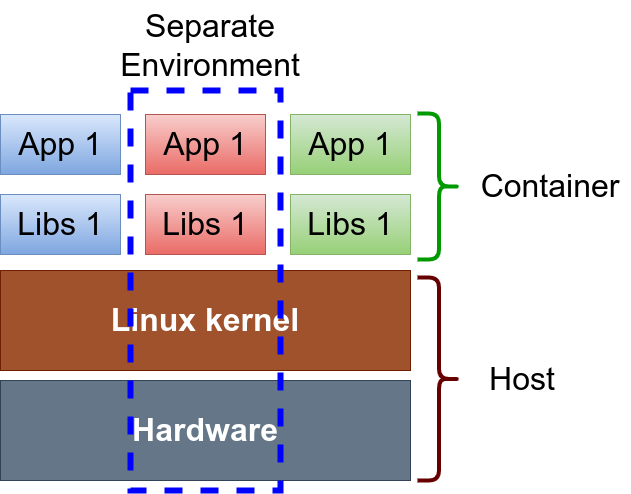
Using containers for applications III
Maintainability:
- Easier application maintenance, distribution and deployment.
- No need to support applications across multiple OS distributions.
- Independance from software changes at the host level.
udocker - origin
-
Need for a consistent portable way of running applications.
- Running applications across different distributions and run-time environments.
-
udockerbegan to be developed in 2015 in the Indigo-DataCloud project.- Proof of concept for running docker containers as a regular user.
-
Focused on running scientific applications in Linux systems.
- Batch or Interactive, HTC or HPC, across sites in grid infrastructures.
Containers for batch processing - I
-
Challenges of running containers (docker) on batch systems:
-
Integration with the batch system (how to start/stop containers, etc.).
-
Respect batch system policies (such as quotas, time and resource limits).
-
Respect batch system actions (job management integration delete/kill).
-
Collect accounting (tight integration).
-
Containers for batch processing - II
- Can we execute in a more simple way?
- Can we download container images (for instance, from Dockerhub or other registries)?
- Can we run without a layered filesystem?
- Can we run without namespaces?
- Can we run without other complex kernel functionalities ?
- Can we run as a regular user without privileges?
Containers for batch processing - III
- When
udockerstarted to be developed these were major limitations:- Now other tools can also address, at least partially, some of these issues.
- singularity/apptainer, podman etc..
- Yet they depend on kernel functionalities, that may not be available everywhere.
- Now other tools can also address, at least partially, some of these issues.
udocker: Introduction - I
udockercan run applications encapsulated in docker containers Without:- Using docker.
- Requiring (root) privileges.
- System administrators intervention.
- Additional system software.
- Requiring Linux namespaces.
- Everything runs in user space:
- As a regular user without privileges.
- Subjected to the normal process controls and accounting.
- Both in interactive or batch systems.
udocker: Introduction - II
-
udockeris open source. -
Developed under the Indigo-Datacloud, DEEP Hybrid-Datacloud, EOSC-Synergy, BigHPC and DT-Geo projects.
-
Github repository: https://github.com/indigo-dc/udocker.
-
Documentation: https://indigo-dc.github.io/udocker/.
udocker advantages: Deployment I
-
udockeris meant to be deployed and used by the end-user:-
Does not require root privileges.
-
Does not require system administrator intervention.
-
All operations can be performed in user space and in user accessible directories.
-
Deployed by default in the user
$HOMEdirectory. -
Containers are in the user
$HOMEdirectory or other user chosen location.
-
udocker advantages: Deployment II
udockerdoes not require compilation by the user:- Written in Python plus some binaries.
- Has a minimal set of dependencies.
- Required binaries are provided statically compiled.
udockerdeployment:- Just copy and untar into the user
$HOMEdirectory. - Ideal to execute containers across different sites and types of resources and infrastructures.
- You can deploy
udockeron the system where you run.
- Just copy and untar into the user
udocker advantages: Execution I
udockerintegrates several execution engines:- Allows execution using multiple different approaches.
- Allows execution with and without using Linux namespaces.
- Integrates several tools suitable to execute containers.
- Makes these tools easier to use across systems.
udockercan be submitted together with a batch job:- (Just fetch or ship the
udockertarball with the job.)
- (Just fetch or ship the
udocker advantages: Execution II
udockeruser interface:- Commands, syntax and logic are similar or even the same as docker CLI.
udockerempowers users to use containers:- Ideal for heterogeneous computing environments.
udocker: Command Line Interface
udocker is mainly a run-time to execute docker containers:
| clone | export | help | images | import |
| inspect | install | load | login | logout |
| mkrepo | name | protect | ps | pull |
| rm | rmi | rmname | search | setup |
| showconf | unprotect | verify | version | create |
| run | save |
By design udocker does not have container creation functionality.
Containers can be created with other tools.
udocker: How does it work…
Programing languages and OS
udockeris implemented:- Python
- the engines and other tools shipped with
udockerare binaries:- C , C++, go
- Can run:
- CentOS 7, RHEL8, RHEL9 (compatible distros)
- Ubuntu >= 16.04
- Any distro that supports python 2.7 and >= 3.6
Components - I
- The
udockerPython code (this is what you need to fetch)- Command line interface.
- Dockerhub API.
- Container and image handling: import, load, save and export.
- Local images repository.
- Interface with the execution engines.
Components - II
udockertools:- Pulled and installed upon first invocation of
udocker. - Set of binary executables and libraries that implement the engines.
- Supporting different OSes and hardware architectures.
- Executables: proot (Pn), runc (Rn), crun (Rn) and patchelf (Fn).
- Libraries: fakechroot (Fn).
- Pulled and installed upon first invocation of
udocker in 4 steps - I
Step 1 - Installation:
- Get the
udockertarball usingcurl,wgetor a browser. - Extract the content of the tarball.
- No need to compile software.
- The first time
udockeris run it will fetch the required binaries.
udocker in 4 steps - II
Step 2 - Get container images:
- Pull containers from docker compatible repositories.:
udocker pull
- Load and save in docker and OCI formats:
udocker loadudocker save
- Import and export tarballs:
udocker importudocker export
udocker in 4 steps - III
Step 3 - Create from images:
- Create the container directory tree from the image:
udocker create
Step 4 - Execute containers:
- Run using several execution methods:
udocker run
udocker in 4 steps - IV
The steps to fetch and execute containers are important:
udocker pull <IMAGE>udocker create <IMAGE>udocker run <CONTAINER-ID-OR-NAME>udocker run <CONTAINER-ID-OR-NAME>udocker run <CONTAINER-ID-OR-NAME>
The created container can be run as many times as you wish.
- You may call
udocker rundirectly but this will create a new CONTAINER every-time. - Will be slow and occupy much more space.
udocker is an integration tool
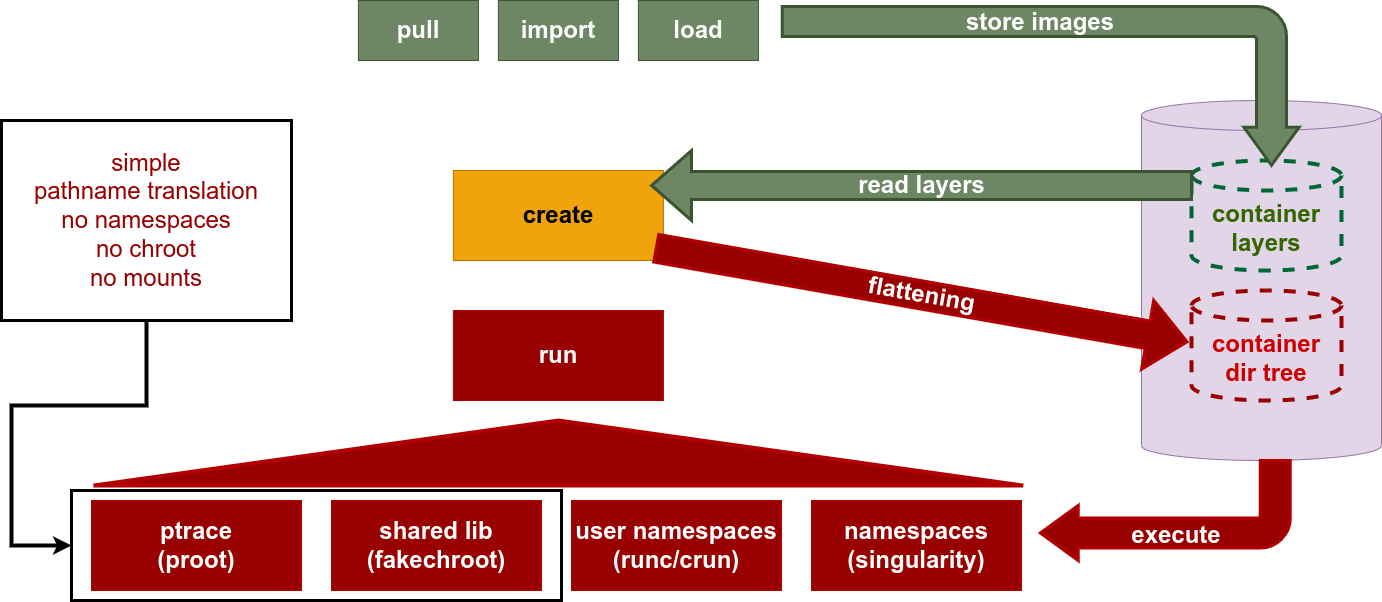
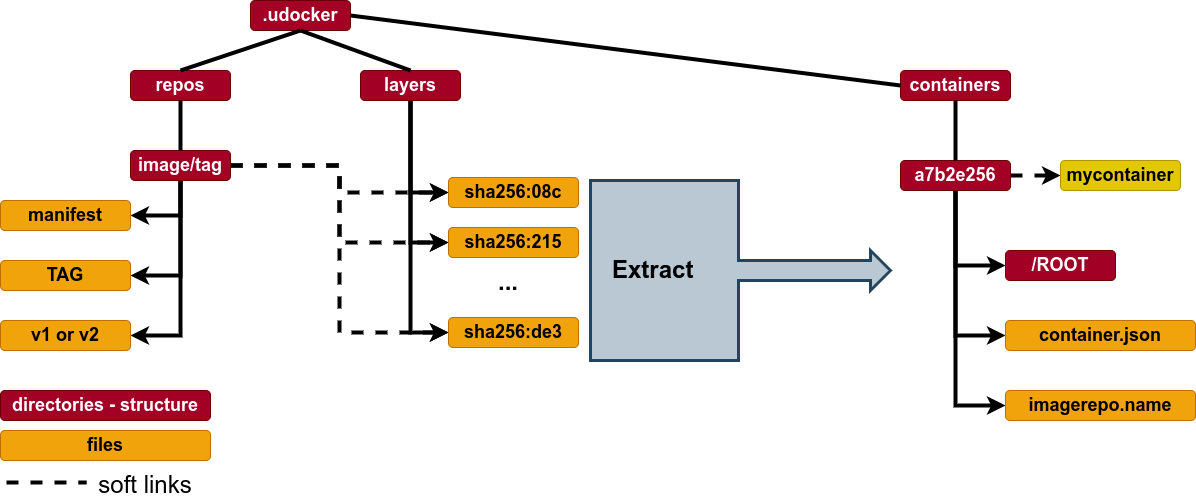
udocker: pull - Images I
- Docker images are composed of:
- Metadata describing the images content and how to run.
- Multiple file-system layers stored as tarballs.
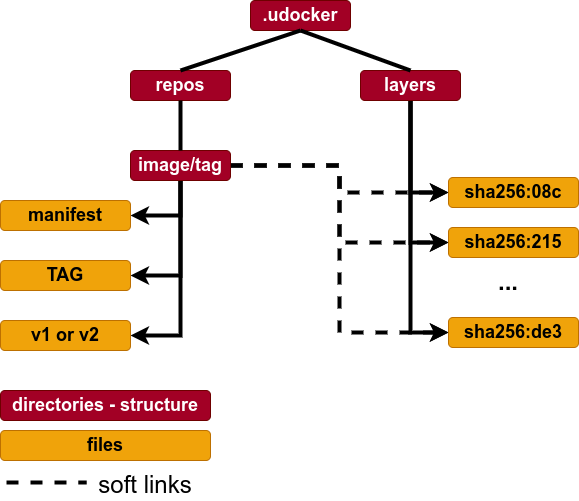
udockerpulls the metadata and layers:- Using the DockerHub REST API.
- Image metadata is parsed to identify the layers.
- Layers are stored in the user home directory under
${UDOCKER_DIR}/.udocker/layers - Image information with links to the layers is under
${UDOCKER_DIR}/.udocker/repos
udocker: pull - Images II
udocker: Create containers - I
- Containers are produced from the images in a process called flattening.
- Each image layer is extracted on top of the previous.
- UnionFS Whiteouts are applied before each layer extraction.
- Protection changes are applied to make files accessible.
- The resulting directory tree is stored under
${UDOCKER_DIR}/.udocker/containers
- Accessing files is easy:
- just cd into
${UDOCKER_DIR}/.udocker/containers/CONTAINER-ID/ROOT.
- just cd into
- The creation can be slow depending on underlying filesystem (e.g. Lustre, GPFS):
- Alternative use the /tmp or some partition local to the host.
udocker: Create containers - II
udocker: Run container
udocker: Execution engines I
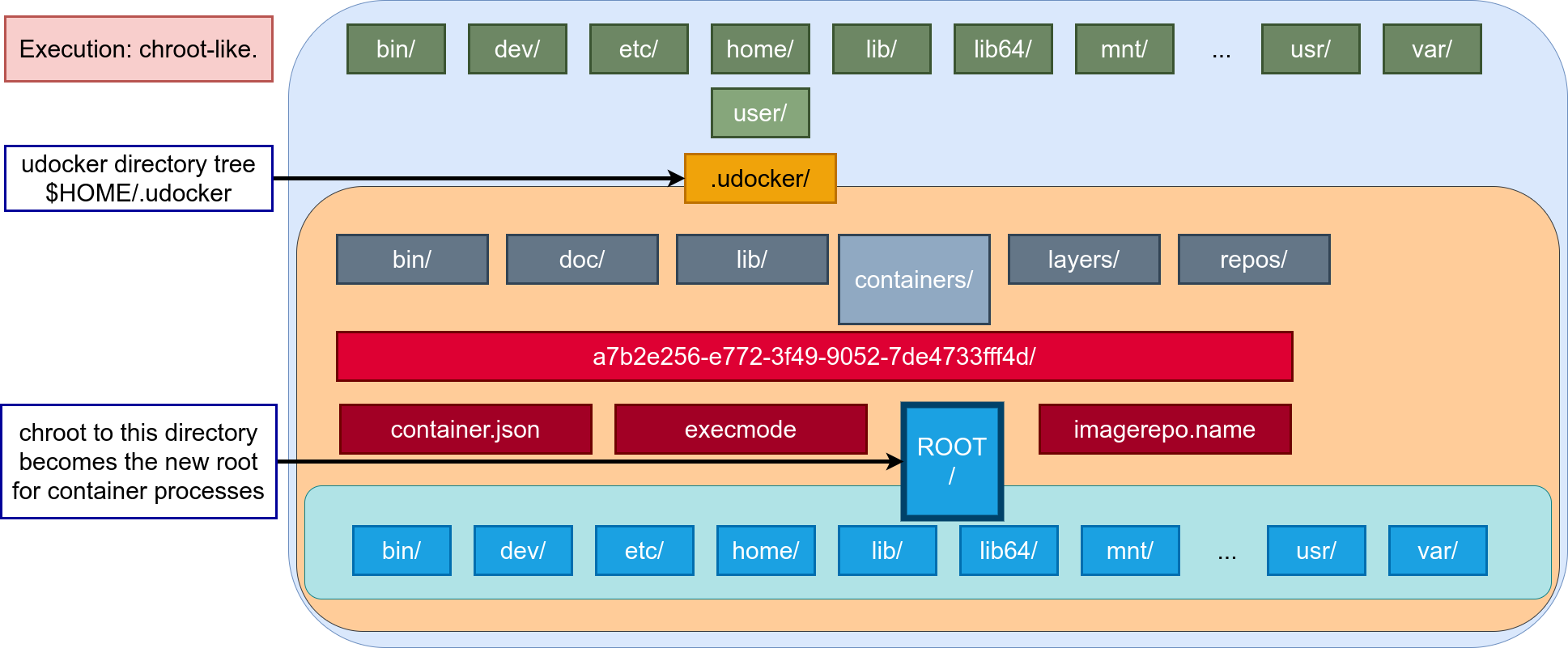
- Like in other container tools execution is achieved by providing
chrootlike functionality. udockersupports several techniques to achieve the equivalent to achrootwithout using privileges.- These techniques can be selected per container via execution modes implemented by execution engines.
udocker: Execution engines II
| Mode | Base | Description |
|---|---|---|
| P1 | PRoot | PTRACE accelerated (with SECCOMP filtering): DEFAULT |
| P2 | PRoot | PTRACE non-accelerated (without SECCOMP filtering) |
| R1 | runC | rootless unprivileged using user namespaces |
| R2 | runC | rootless unprivileged using user namespaces + P1 |
| R3 | runC | rootless unprivileged using user namespaces + P2 |
| F1 | Fakechroot | with loader as argument and LD_LIBRARY_PATH |
| F2 | Fakechroot | with modified loader, loader as argument and LD_LIBRARY_PATH |
| F3 | Fakechroot | modified loader and ELF headers of binaries + libs changed |
| F4 | Fakechroot | modified loader and ELF headers dynamically changed |
| S1 | Singularity | where locally installed using chroot or user namespaces |
Selection in terms of performance
| Mode | Base | Description |
|---|---|---|
| P1 | PRoot | System call intensive applications may suffer degradation |
| P2 | PRoot | Same limitations as P1 apply. All system calls are traced causing higher overheads than P1 |
| R1 | runC | Same performance as namespace based applications |
| R2 | runC | Only for software installation and similar. Same performance as P1 |
| R3 | runC | Only for software installation and similar. Same performance as P2 |
| F1 | Fakechroot | All Fn modes have similar performance during execution. Frequently the Fn modes are the fastest |
| F2 | Fakechroot | Same as F1 |
| F3 | Fakechroot | Same as F1. Setup can be very slow |
| F4 | Fakechroot | Same as F1. Setup can be very slow |
| S1 | Singularity | Similar to Rn |
Selection in terms of interoperability I
| Mode | Base | Description |
|---|---|---|
| P1 | PRoot | PTRACE + SECCOMP requires kernel >= 3.5. Can fall back to P2 if SECCOMP is unavailable |
| P2 | PRoot | Runs across a wide range of kernels even old ones. Can run with kernels and libraries that would fail with kernel too old |
| R1 | runC | User namespace limitations apply |
| R2 | runC | User namespace limitations apply. Same limitations as P1 also apply, this is a nested mode P1 over R |
| R3 | runC | User namespace limitations apply. Same limitations as P2 also apply, this is a nested mode P2 over R |
Selection in terms of interoperability II
| Mode | Base | Description |
|---|---|---|
| F1 | Fakechroot | May escape and load host libraries. Requires shared library compiled against same libc as in container |
| F2 | Fakechroot | Same as F1 |
| F3 | Fakechroot | Requires shared library compiled against same libc as in container. Binary executables and libraries get tied to the user HOME pathname |
| F4 | Fakechroot | Same as F3. Executables and libraries can be compiled or added dynamically |
| S1 | Singularity | Not part of udocker must already exist on the system, may use user namespaces or chroot |
udocker: Running applications …
udocker & Lattice QCD
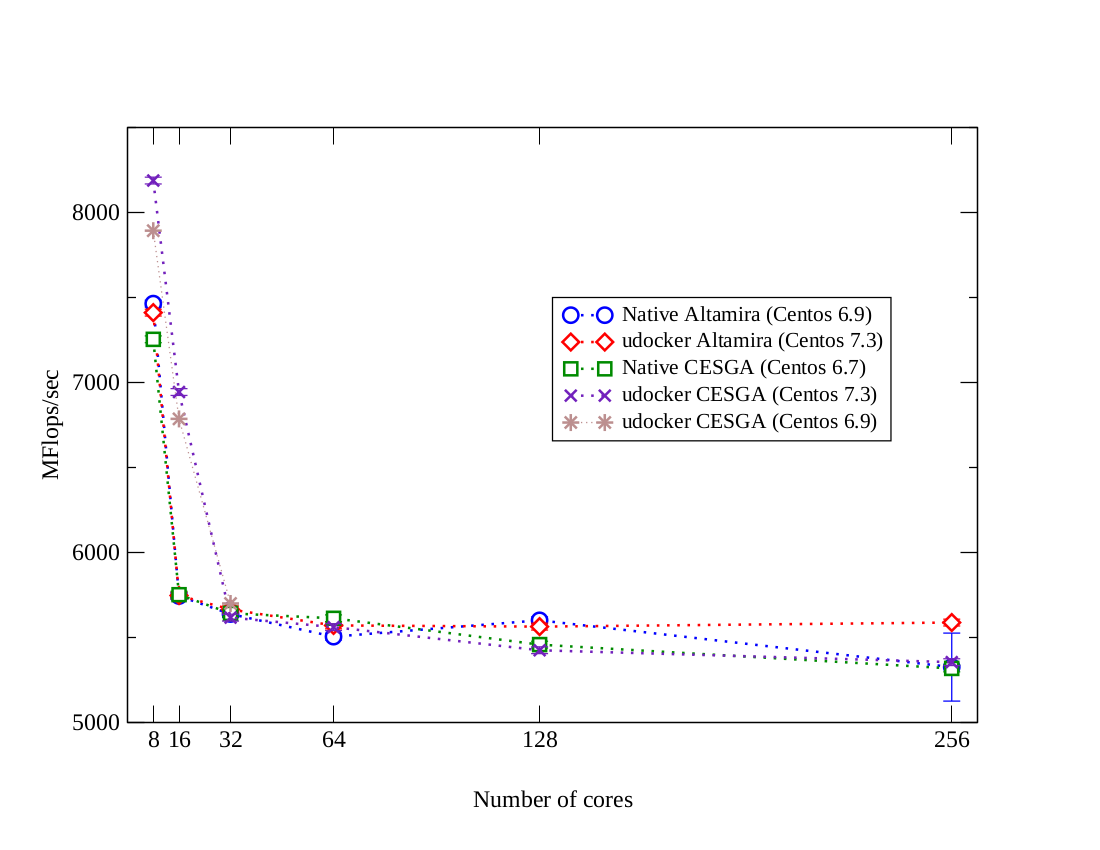
OpenQCD is a very advanced code to run lattice simulations.
Scaling performance as a function of the cores for the computation of application of the Dirac operator to a spinor field.
Using OpenMPI, udocker in P1 mode.
udocker & Molecular dynamics
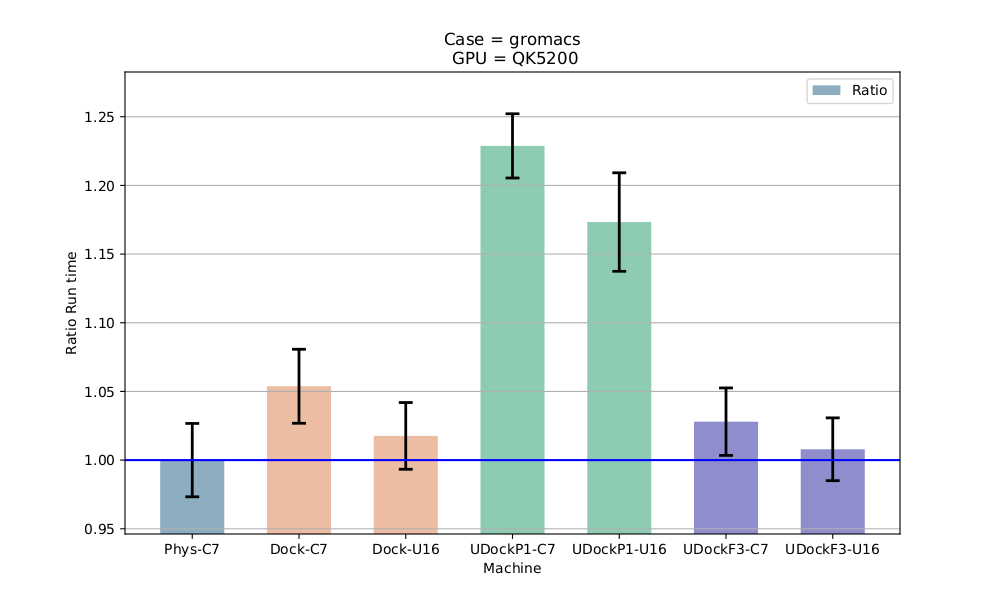
Gromacs is widely used both in biochemical and non-biochemical systems.
In this comparison Gromacs was run using CUDA and OpenMP:
udockerusing P mode has lower performance with Gromacs.udockerusing F mode has same or better performance as Docker.
udocker & Phenomenology I
MasterCode connects several complex codes:
- Hard to deploy.
- Scanning through large parameter spaces.
- High Throughput Computing.
- C++, Fortran, many authors, legacy code.
udocker & Phenomenology II
Performance Degradation (udocker in P1 mode)
| Environment | Compiling | Running |
|---|---|---|
| HOST | 0% | 0% |
| DOCKER | 10% | 1.0% |
| udocker | 7% | 1.3% |
| VirtualBox | 15% | 1.6% |
| KVM | 5% | 2.6% |
Thank you!
Questions ?
Backup slides
Other container technologies
- Singularity/Apptainer (LBL) https://apptainer.org/ -
udockercurrently supports it as execution mode. - Charliecloud (LANL) https://charliecloud.io/.
- Shifter (NERSC) https://docs.nersc.gov/development/containers/shifter/how-to-use/.
- Podman (RedHat) https://www.redhat.com/en/topics/containers/what-is-podman.